
Stopping Intrusions Before the Damage Is Done: How Camcloud Remote Video Monitoring Protects Your Business After Hours
Cloud video surveillance has revolutionized how businesses can easily deploy and manage video surveillance across their locations. With the Camcloud platform, you can monitor every location from a single login and keep your footage stored securely in the cloud for whenever you need it, including unlocking value-added capabilities like Cloud AI and long-term secure archival storage. But recorded footage alone only tells you what happened after the fact. Once the doors are locked and the last employee has gone home, a different question takes over: who is watching my business right now?
That is where Camcloud Remote Video Monitoring comes in. By pairing cloud video surveillance with AI video analytics and live, professional operators, Camcloud turns the cameras you already rely on into an active line of defence that runs the same five steps, every time. It also answers the question we hear most: “I love knowing my premises are being recorded, but what exactly happens when an intruder is on my site after hours?”
Here’s how it works:
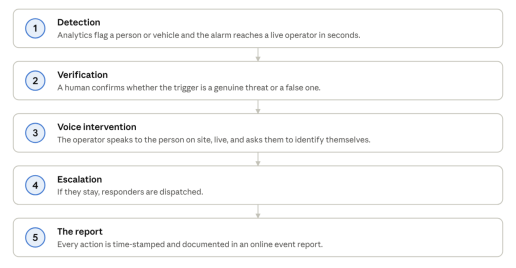
Step 1: Detection Reaches a Live Operator in Seconds
The process starts when the configured AI video analytics detects a person or vehicle in an area that should be empty, triggering an alarm that is sent to the remote monitoring centre. Before an alert ever reaches an operator, advanced video AI helps eliminate and filter out approximately 95% of common false alarms caused by weather, animals, headlights, and other environmental activity. A schedule is also put in-place so these alerts only happen certain times of day, e.g. after hours.
When an alarm comes in, the operator has two important things in front of them: the footage that triggered the alert and the site’s current live camera feeds. This allows them to see what caused the alarm while simultaneously understanding what’s happening on the property in real time.
They also have access to the property’s specific security information, including monitoring hours, camera and speaker locations, authorized personnel, site notes, and the agreed-upon response procedure. Rather than following a generic script, operators follow the instructions established for each individual property.
Here is how that looks for an illustrative residential construction site:
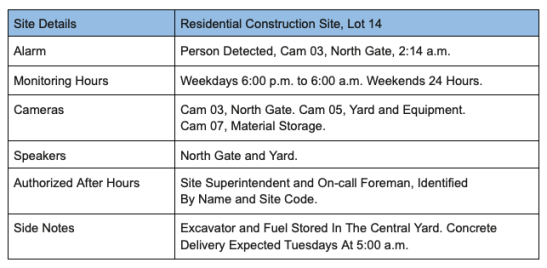
The response procedure for the site:
- Voice intervention: Through the on-site speakers. The person is asked to leave or identify themselves.
- Voice intervention: Second warning through the on-site speakers if the person remains on site.
- Dispatch as the situation requires: Police for an intrusion in progress, the security agency for a patrol, EMS if anyone is injured.
- Close the event: Document every step in the event report shared with the integrator.
Illustrative example. Every site’s details and procedure are set up with its integrator.
Step 2: A Human Verifies the Activity
Before taking further action, the operator determines whether the alert represents a genuine security concern or a false trigger.
If the alert is caused by something harmless, such as a moving flag, a squirrel, or a leaf passing in front of the camera, the event is cleared and logged. No further action is required.
If a person is detected, the process moves immediately to the next step.
Importantly, operators don’t simply assume someone is authorized to be on the property based on what they see on camera. Every person who triggers an alarm is treated consistently: they are addressed and asked to identify themselves.
This removes guesswork from the most critical moments of the response and ensures that suspicious activity is properly addressed rather than dismissed based on assumptions.

Step 3: Live Voice Intervention
Once a person is confirmed on site, the operator can communicate with them directly through the property’s on-site speakers. This isn’t a prerecorded warning. It’s a live operator speaking to the individual in real time.
From there, two things can happen.
If the person is authorized to be there: They can call in and identify themselves using their ID or the property’s designated site code. The operator verifies that they have permission to be on the premises and stands down.
If the person is not authorized: Being directly addressed by a live operator, who can even describe what they’re wearing, can be enough to stop an intrusion before any damage occurs. If the individual remains on the property, a second voice warning can be issued through the speakers.
Step 4: Escalation and Emergency Response
If the individual doesn’t leave after the voice intervention, the operator follows the escalation procedure established for that specific property.

Step 5: Every Event Is Documented
Every action taken by the operator is time-stamped and documented in an online event report, including how the situation unfolded and how it was resolved.
For example, an intrusion at a construction site might generate the following report:
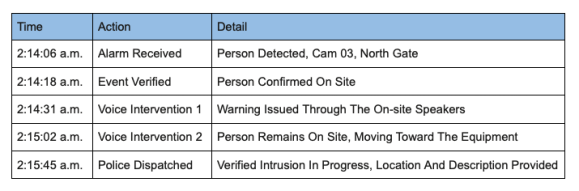
Illustrative example, following the event shown in step one.
These records are shared with the integrator and serve several purposes, like support police and insurance files by providing a clear sequence of events, help during client reviews by showing exactly what happened and when, and identify recurring patterns that may indicate a need to adjust camera placement, monitoring schedules, or detection zones.
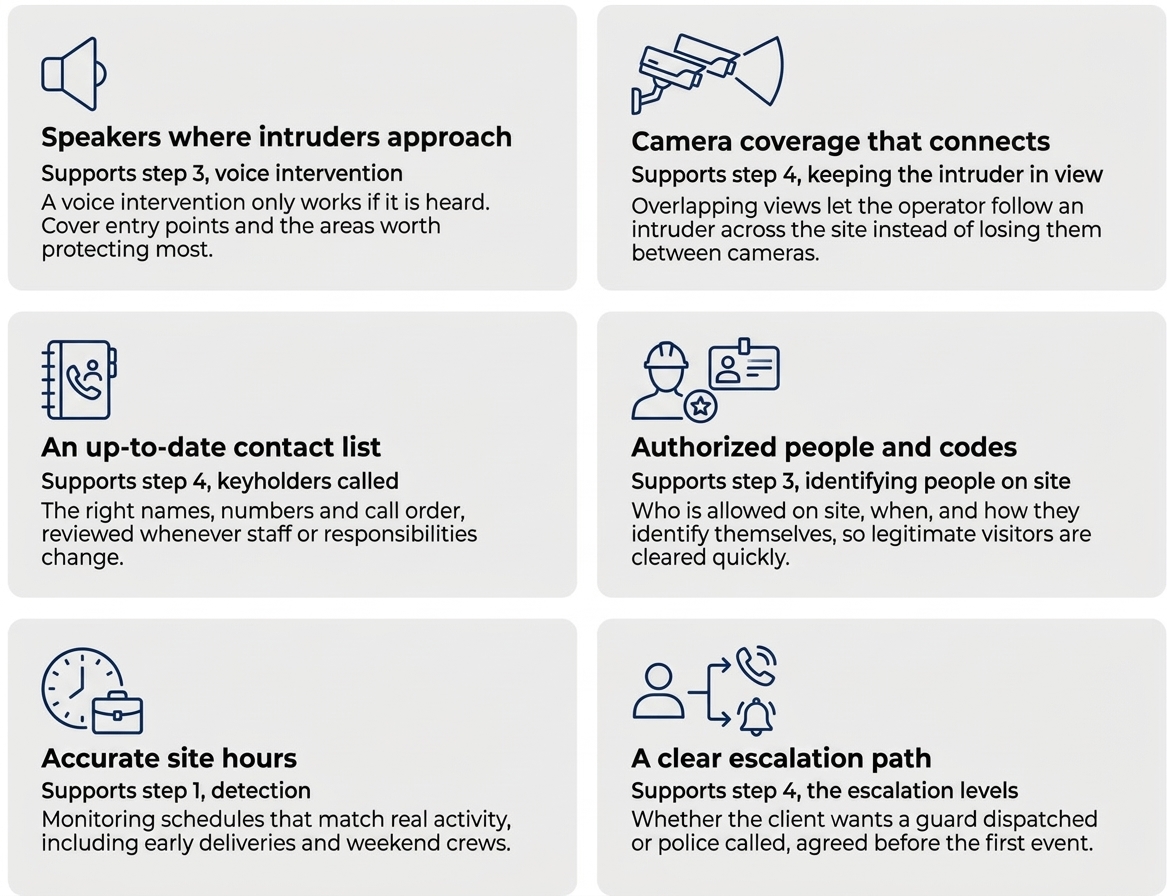
What Needs to Be Set Up Before Monitoring Begins?
The protocol is the same everywhere. How well it performs depends on a few things decided at installation, most of them in the integrator’s hands.
What Does This Mean for Your Business?
Remote video monitoring adds another layer of security beyond simply having cameras recording your property. It means suspicious activity can be addressed while it’s happening, with a live operator verifying the situation and coordinating the appropriate response.
- Intervention before damage.
- Fewer false dispatches.
- A clear record, every time.
With Camcloud’s Remote Video Monitoring, your business has more than recorded footage to rely on. Having cameras is important, but knowing what happens when your business is closed is crucial.
Ready to know who is taking care of your business after hours? Contact us to schedule a demo or get pricing, and see how Camcloud Remote Video Monitoring can protect your people and your property.

No Comments