
New feature: User logging
Access Logs Have Arrived!
A heavily requested feature is finally here — User Logging!
Ever wondered what users are doing on Camcloud? With the new Access Logs, you’ll finally have answers to questions like:
- Who deleted that camera?
- Who logged in — and when?
- Which cameras are being viewed?
- How often are users streaming cameras?
You’ll be able to answer these questions and many more.
Introducing Access Logs

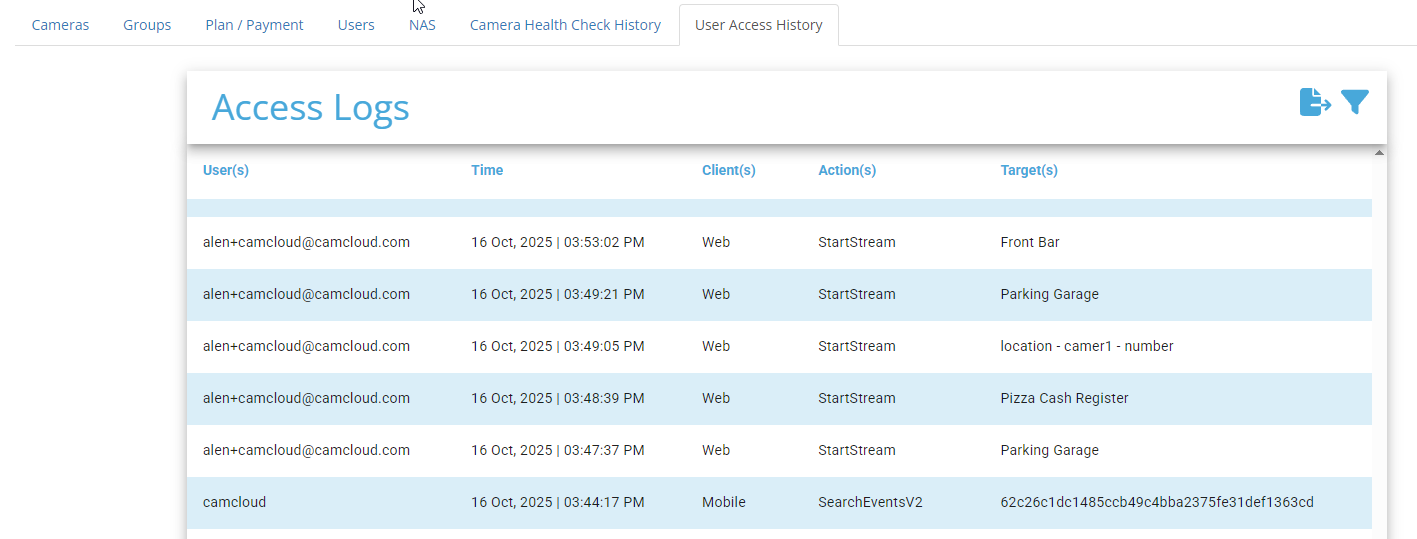
The Access Logs table gives you a detailed record of all user activity. Most columns are self-explanatory, but here’s a quick breakdown:
- User – The username of the person performing the action.
- Time – The exact date and time of the log entry.
- Client – Where the action came from (Web, Mobile, or API).
- Action – The event performed. Examples include:
-
StartStream– Someone started a live stream. -
ListCamerasV1orListCamerasV2– A user fetched their camera list. -
DeleteCamera– You guessed it — a camera was deleted.
-
-
Target – The camera associated with the action.
Updated Menu Navigation
To access Access Logs, go to the History menu.
We’ve made some adjustments to improve organization:
-
Downloads now contains both standard and Cold Storage downloads.
-
History contains Camera Health Check alerts and your new Access Logs.

If you’re using the Admin Portal, you’ll find Access Logs under User Access History tab:
Powerful Filtering Capabilities

The filtering tools let you zero in on specific users, cameras, actions, or time ranges. You can even use Duration to summarize actions per user over a defined period.
Note: For now, filtering supports one query type at a time. For example, you can filter all
StartStreamlogs or allListCameraslogs, but not both simultaneously. We plan to make this more flexible in a future update.
Export Your Results
Once you’ve refined your search, export your logs in CSV, JSON, or XML formats for further analysis or record keeping.
We’d Love Your Feedback
As always, we’d love to hear what you think!
Try out Access Logs today and let us know how it helps you manage your users and cameras more effectively.

No Comments