
Introducing Advanced Notifications
Smarter, Personalized Alerts Powered by Event Explorer
Modern video surveillance isn’t just about capturing events. It’s about making sure the right people know when something important happens.
Traditional video surveillance systems or standalone cameras often generate too many alerts or lack the flexibility needed for today’s AI-powered surveillance environments. As organizations deploy more cameras, locations, and intelligent analytics, users need notifications that are advanced, customizable and intelligent..
That’s why we’ve completely redesigned notifications in Camcloud.
Built on the same advanced filtering engine introduced with our Next Gen Event Explorer, Advanced Notifications give every user the ability to create highly customized, event-driven alerts tailored to their specific role, cameras, and operational needs. New bulk management tools also make it easier than ever to configure notifications across large camera deployments.
Keep reading below or jump to Notifications Support KB article to get into the specifics!
Personalized Notifications for Every User
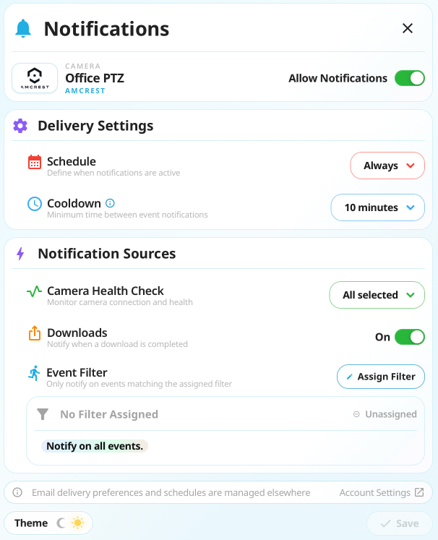
One of the biggest improvements is that notifications are now configured on a per-user basis.
Previously, notification settings were shared across an account. Now, every user can create and manage their own notification preferences without affecting anyone else.
A security manager, operations team, and site supervisor can all monitor the same cameras while receiving completely different alerts based on what matters most to them.
Even better, existing notification settings continue working exactly as before. There is nothing you need to reconfigure unless you want to take advantage of the new capabilities.
Powered by Event Explorer’s Filtering Engine
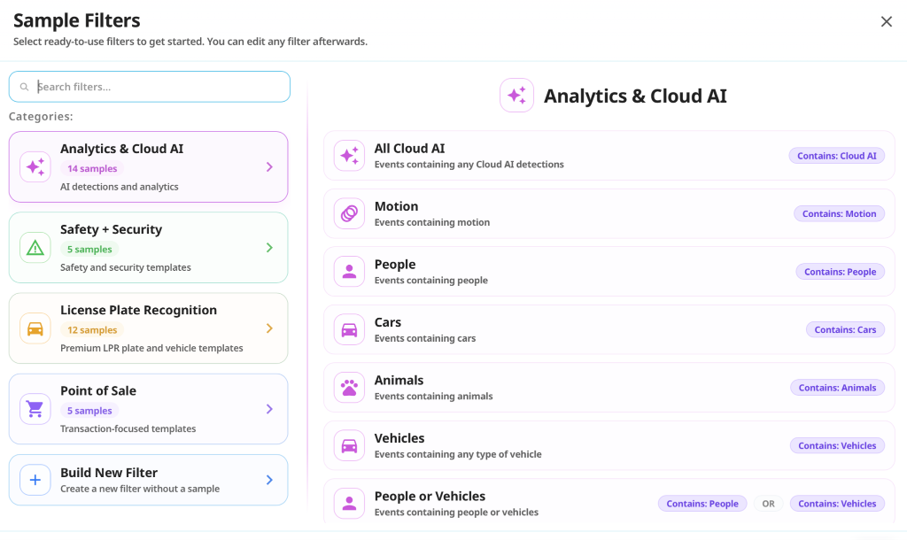
Advanced Notifications are built on the same powerful event filtering engine introduced with Event Explorer.
Instead of creating simple motion-based alerts, users can now build sophisticated event rules that combine AI detections, camera analytics, and any custom event filters.
Create notifications for events such as:
- A specific license plate entering a property
- More than four people gathering in a designated area
- Vehicles detected after business hours
- People loitering near an entrance
- Motion combined with AI object detection
- Custom combinations of filters using AND / OR logic
The result is a notification system that delivers relevant alerts while dramatically reducing unnecessary noise.
Customize Alerts for Every Camera
Every camera can have its own unique notification rules.
Whether you’re monitoring a parking lot, warehouse, retail entrance, construction site, or office building, each camera can be configured independently based on the activity that matters in that location.
You can also create combined notification rules for the same camera, allowing different event types to trigger different alerts.
For example, one camera could notify you when:
- A blacklisted license plate is detected
- More than three people are present after hours
- Vehicle activity occurs only on weekends
This level of flexibility makes it easier to tailor surveillance workflows to real-world operational requirements.
Configure Notifications at Scale
Managing notifications across dozens, or even hundreds, of cameras shouldn’t require repeating the same setup over and over.
With Bulk Notifications, administrators can apply notification settings across multiple cameras or camera groups from a single configuration. Whether you’re enabling notifications for an entire site, assigning the same event filter across multiple entrances, or updating delivery settings for a group of cameras, Bulk Notifications dramatically reduces setup time while helping maintain consistency across your deployment.
Simply select the cameras or groups you want to manage, choose your notification preferences, and apply them all at once.
For organizations managing large deployments, this makes configuring and maintaining notifications significantly more efficient.

Notifications That Work Around Your Schedule
Not every event requires an immediate notification.
Advanced Notifications include flexible scheduling, so alerts are only delivered when you actually need them.
For example, you might choose to:
- Receive perimeter alerts only after business hours
- Monitor deliveries during weekends
- Enable construction site monitoring overnight
- Limit notifications to specific shifts or operating hours
Combined with advanced event filtering, scheduling helps eliminate unnecessary interruptions while ensuring important activity never goes unnoticed.
Control Notification Frequency
Repeated events can quickly overwhelm operators.
Advanced Notifications include configurable notification intervals, allowing you to control how frequently alerts are delivered after an event occurs.
Instead of receiving dozens of notifications for the same activity, Camcloud intelligently spaces alerts according to your preferred interval. This helps reduce notification fatigue without sacrificing awareness.
Notifications can be delivered through both email and mobile push notifications, ensuring your team stays informed wherever they are.
Enhanced Camera Health Monitoring
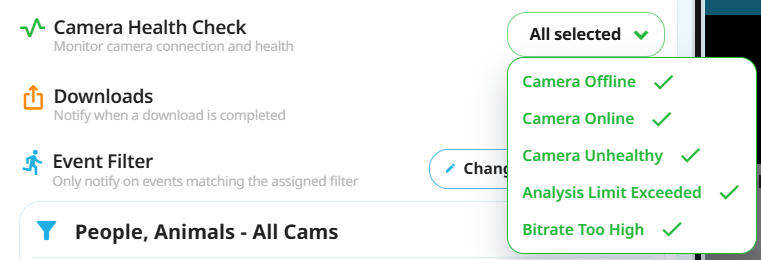
Advanced Notifications also expand camera health monitoring with more granular system alerts.
Choose exactly which camera health events should generate notifications, including:
- Camera offline
- Camera back online
- Camera inaccessible
- Low bandwidth alerts
This allows administrators to proactively monitor system health while avoiding unnecessary status updates that aren’t relevant to their workflow.
Built for Modern Video Surveillance
Advanced Notifications represent the next evolution of intelligent video surveillance.
By combining personalized notification preferences, Event Explorer’s advanced filtering engine, flexible scheduling, camera-specific rules, and enhanced health monitoring, Camcloud helps organizations move beyond basic motion alerts toward truly actionable notifications.
Whether you’re managing a single location or hundreds of cameras across multiple sites, Advanced Notifications help ensure every user receives the information they need, exactly when they need it.
Now Available
Advanced Notifications are now available within the Camcloud platform. Read our Notifications Support KB article.
If you are interested in further details or would like to arrange a personalized walkthrough, please get in touch with our specialists.

No Comments